
















Building a Software-as-a-Service (SaaS) product is fundamentally different from building a standard web application. A standard web app usually serves a single organization. A SaaS application, however, must securely serve multiple distinct organizations (tenants) from the same codebase, track their usage, bill them accordingly, and protect their data from cross-contamination. This complexity means that selecting your SaaS technology stack is one of the most critical decisions your engineering team will make.
In 2026, the baseline expectations for B2B and B2C SaaS products have never been higher. Customers expect enterprise-grade security, seamless single sign-on (SSO), and, increasingly, embedded AI features. To meet these demands without burning through years of development runway, you need a highly optimized SaaS stack. You cannot afford to reinvent the wheel on core infrastructure like user management or subscription logic.
Determining the best tech stack for SaaS is no longer just about picking your favorite programming language. It is an architectural commitment that dictates your time-to-market, your ability to hire engineers, your compliance readiness, and your eventual scaling limits. In this comprehensive guide, we will break down exactly how to architect your system, from multi-tenant data isolation and event-driven APIs to testing strategies and AI observability, ensuring your foundation is built for the realities of 2026.
Best Tech Stack for Multi Tenant SaaS 2026: What a SaaS Tech Stack Actually Includes
When evaluating a SaaS technology stack, you must divide your architecture into two distinct layers: the Product Stack (what delivers your unique business value) and the Infrastructure Stack (the engine that allows it to operate as a SaaS)
If your team spends 80% of its time building the infrastructure stack, you are going to lose to competitors who focus on the product.
A complete SaaS stack in 2026 includes the following mandatory blocks:
- Authentication & Identity: Handling secure logins, multi-factor authentication (MFA), and organization-level roles.
- Billing & Metering: Tracking usage limits, processing credit cards, and handling subscription downgrades/upgrades.
- API Layer: Delivering data to your frontend, mobile apps, or third-party developer integrations securely.
- Monitoring & Observability: Tracing errors, tracking application performance, and monitoring LLM usage.
- Security & Isolation: Ensuring Tenant A can never access Tenant B’s data under any circumstances.
Mini-Checklist: SaaS Stack Components:
- Is your product stack cleanly separated from your infrastructure stack?
- Have you chosen an identity provider for authentication?
- Is your billing engine capable of handling prorated upgrades?
- Do you have an API gateway for external rate limiting?
- Are you utilizing a centralized logging and monitoring system?
Best Tech Stack for SaaS (How to Choose Without Overengineering)
The absolute best tech stack for SaaS is the one your current team knows best, because team expertise usually matters more than raw benchmarks as long as the stack still meets up-to-date compliance and scaling requirements. Overengineering on day one (e.g., building 15 microservices for a 100-user MVP) is the leading cause of an early startup death.
When evaluating technologies for SaaS startups, filter them through these five criteria:
- Time-to-Market: Can this framework deliver a working MVP in 3-4 months?
- Hiring: Is there a massive, accessible talent pool for this language (e.g., TypeScript, Python, Go)?
- Scalability: Does the framework have a clear path from a single monolithic server to horizontal scaling?
- Compliance Readiness: Does the tech make it easy to implement audit logs and encryption required for SOC2?
- Vendor Lock-in: Are you utilizing proprietary cloud features that make migration impossible, or sticking to open standards (like Docker and standard SQL)?
What to Prioritize in 2026:
- Multi-tenant readiness: Build for B2B organizational structures from day one.
- Billing & subscription flows: Automate revenue collection immediately; manual invoicing does not scale.
- Security baseline: Enforce zero-trust architecture and strict role-based access control (RBAC).
- AI observability: If you use LLMs, you must monitor prompt costs and hallucination rates natively.
Mini-Checklist: Stack Selection Criteria
- Does the founding team have deep experience in the chosen core language?
- Is there an active, well-maintained open-source ecosystem for the framework?
- Can the stack be containerized (Docker) for environment consistency?
- Are you avoiding obscure, dying programming languages?
- Have you evaluated the cost of third-party managed services versus self-hosting?
Multi-Tenant SaaS Architecture (The Core Decision)
Your approach to multi tenancy SaaS architecture is the most irreversible decision you will make. It dictates how your database, caching layer, and application servers handle traffic from different customers.
In a traditional model built around single tenant architecture, every customer gets their own server and their own database. While highly secure, this is an operational nightmare to update and maintain at scale. A true multi tenant architecture SaaS serves multiple customers from a single application instance, maximizing compute efficiency and allowing you to push updates to all customers simultaneously.
However, sharing infrastructure requires strict tenant isolation. You must ensure that an SQL injection vulnerability or a broken API endpoint cannot accidentally expose one organization’s data to another. Isolation must happen at the data level, the authentication level, and the resource level — preventing the “noisy neighbor” problem where one high-usage tenant slows down the app for everyone else. Getting this wrong doesn’t just create a security risk; it directly shapes your long-term operational costs
Multi-tenant architecture options are:
| Option | Pros | Cons | Best for |
| Single-Tenant (Silo) | Maximum security; easy compliance; no noisy neighbors. | Huge operational overhead; high infrastructure costs; slow updates. | Healthcare, GovTech, SaaS with strict compliance requirements, and enterprise customers. |
| Multi-Tenant (Pool) | Lowest cost; highly scalable; often runs on a single database or shared infrastructure on one database server; instant updates for all users. | High risk of data leakage if coded poorly; noisy neighbor risks. | B2C SaaS, SMB-focused B2B SaaS, product-led growth (PLG) apps. |
| Hybrid (Pod/ Bridge) | Shared application servers, but dedicated databases for VIP clients. | Architecturally complex; requires sophisticated routing logic. | Mid-market to Enterprise B2B SaaS scaling rapidly. |
Mini-Checklist: Multi-Tenant Architecture
- Have you defined what constitutes a “tenant” in your system (e.g., a Workspace or Organization)?
- Is tenant isolation enforced at the database query level?
- Do you have rate limiting in place per tenant to prevent noisy neighbors?
- Can you easily wipe a single tenant’s data upon account deletion (GDPR)?
- Is your caching layer (e.g., Redis) strictly segregating keys by tenant ID?
Multi-Tenant Database Design (Practical Options)
Once you commit to a multi-tenant application, you must choose your multi tenant database design and shape the underlying data model. This decision heavily impacts your backup strategy, scaling limits, and ability to sell to enterprises.
- Shared Database, Shared Schema (Row-Level Isolation): Every table has a tenant_id column. You use Postgres Row-Level Security (RLS) or application-level ORM scoping to ensure queries only return data for the active tenant, with the tenant context enforced on every single request. This is the most common, cost-effective starting point.
- Shared Database, Separate Schemas: All tenants share the same physical database instance, but each tenant gets their own database schema (e.g., tenant_a.users, tenant_b.users). This offers better logical isolation and makes per-tenant backups easier, but schema migrations become painful as you scale past 1,000 tenants.
- Database per Tenant: Every tenant gets a completely separate physical or logical database. PostgreSQL is usually the primary database for this kind of relational multi-tenant workload because it gives you strong consistency and data integrity. This provides ultimate security and is often required by Fortune 500 clients, but infrastructure costs will skyrocket, and connection pooling becomes a major engineering hurdle.
Mini-Checklist: Database Design
- Are you enforcing the tenant_id at the ORM/query builder level automatically?
- Have you evaluated Postgres Row-Level Security (RLS) for your use case?
- Does your migration system support updating multiple schemas if necessary?
- Can you reliably restore a single tenant’s data without rolling back the entire database, ideally using point in time recovery?
- Are your database connection pools configured to handle peak load across all tenants?
SaaS API Architecture (REST, GraphQL, Events)
Your SaaS api architecture is the backbone of your application. In 2026, building a monolithic API that simply returns HTML is obsolete. You need an API that can power your single-page application (SPA), your mobile apps, your customers’ custom integrations, and other surfaces serving multiple clients. In practice, this API sits in the application layer, handling business logic and coordinating requests behind the UI while exposing them cleanly to other surfaces.
- REST (Representational State Transfer): Remains the default standard. It is highly cacheable, universally understood, and easy to secure. For standard CRUD (Create, Read, Update, Delete) operations, REST is perfectly sufficient.
- GraphQL: Highly recommended if your SaaS has complex data relationships and your frontend requires high flexibility to avoid over-fetching data. However, GraphQL is notoriously difficult to secure against complex, nested queries (query depth limiting is mandatory).
- Event-Driven Architecture (Webhooks & Message Queues): Crucial for background processing. Billing events, audit log writing, and sending emails should not block the main API thread. Utilize tools like Kafka, RabbitMQ, or AWS SQS to handle asynchronous tasks reliably.
Mini-Checklist: API Architecture
- Are all API endpoints strictly versioned (e.g., /v1/users) from day one?
- Is your API fully documented using OpenAPI/Swagger specifications?
- Are you using an API Gateway for rate limiting and payload validation?
- Do you have a robust webhook system to notify clients of asynchronous events?
- Are background jobs decoupled from the main HTTP request/response cycle?
SaaS Billing System & Subscription Management (Don’t DIY Too Early)
The most common trap for engineering-led teams is attempting to build their own SaaS billing system. Calculating prorated upgrades, handling failed credit card retries (dunning), managing international taxes, generating compliant invoices, and managing payment processing is a massive domain.
Robust subscription management SaaS tools exist to abstract this complexity. Building this in-house provides zero competitive advantage to your product and introduces catastrophic risk.
A modern billing engine must handle:
- Tiered subscriptions (e.g., Basic, Pro, Enterprise).
- Usage based billing (e.g., charging per API call or per gigabyte).
- Grandfathering legacy users into old pricing plans.
- Automated tax collection (VAT, Sales Tax) based on user location.
Build vs Buy for SaaS billing & subscriptions
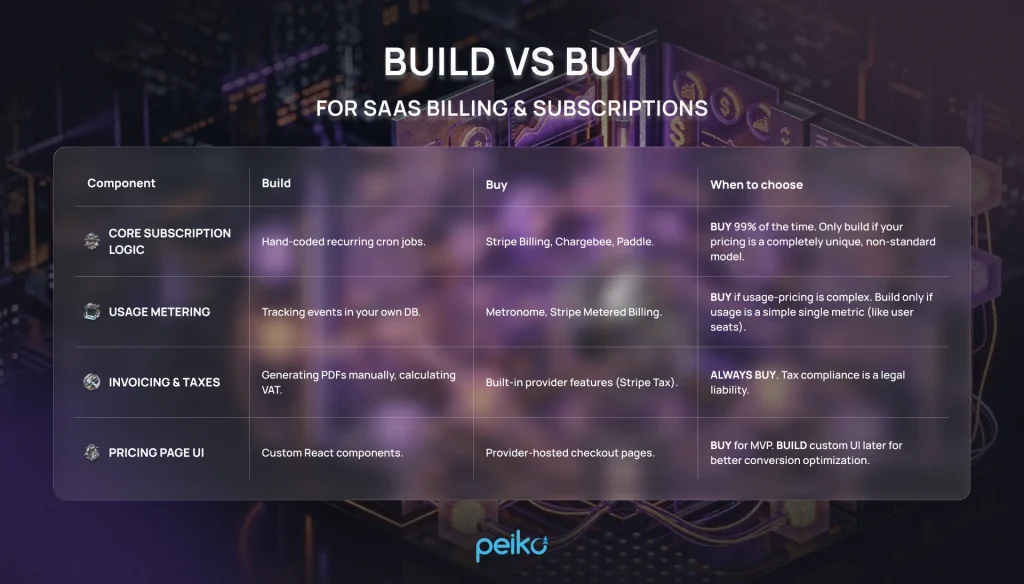
Mini-Checklist: Billing & Subscriptions:
- Have you integrated a third-party payment gateway and subscription manager?
- Is your application reliably listening to billing webhooks (e.g., invoice.paid)?
- Does the system gracefully handle expired credit cards without instantly deleting user data?
- Can users easily upgrade, downgrade, and cancel directly from their settings page?
- Are you syncing billing data to your analytics stack for MRR tracking?
SaaS User Management (Auth, Roles, Teams)
Effective SaaS user management requires thinking beyond the individual “User.” In B2B SaaS, user management sits inside the product’s authentication system or auth system, and the foundational entity is the “Organization” or “Workspace,” with Users belonging to one or more Organizations.
You must implement Role-Based Access Control (RBAC) early. A standard setup includes Owner, Admin, Editor, and Viewer roles. Hardcoding permissions is a mistake; use a robust authorization library or service to define granular permissions (e.g., can_delete_invoice). Session management should live in this same identity layer, not be bolted on separately.
Furthermore, enterprise readiness requires Single Sign-On (SSO). If you want to sell to companies with more than 100 employees, they will demand integration with Okta, Azure AD, or Google Workspace via SAML or OIDC.
Mini-Checklist: User Management
- Are users distinctly separated from organizational accounts in your database?
- Is Role-Based Access Control (RBAC) enforced at the API route level?
- Have you implemented secure password hashing (e.g., Argon2 or bcrypt)?
- Is Multi-Factor Authentication (MFA/TOTP) available for users?
- Is your architecture prepared to support SAML/SSO for enterprise clients?
Best Hosting for SaaS (2026 Options)
Selecting the best hosting for saas depends heavily on your team’s DevOps expertise, your funding, and your saas deployment needs.
- Platform as a Service (PaaS): Platforms like Vercel and Render are perfect for MVP and growth-stage startups. They handle SSL, deployments, and scaling automatically. Heroku remains usable but has scaled back its free and low-tier offerings in recent years, so newer teams increasingly default to Vercel or Render for the same “zero DevOps” experience. Whichever you choose, you’ll pay a premium for compute, but spend less time managing infrastructure and save hundreds of hours of DevOps engineering time.
- Serverless: Utilizing AWS Lambda or Google Cloud Functions allows you to scale to zero and pay only for exact usage. It is highly scalable but introduces architectural complexity, cold starts, and severe vendor lock-in.
- Kubernetes (K8s) / Container Orchestration: The enterprise standard. If you need granular control over microservices, compliance boundaries, and auto-scaling, K8s is required. However, do not adopt Kubernetes unless you have a dedicated infrastructure engineer.
Mini-Checklist: Hosting Infrastructure:
- Is your deployment process fully automated via CI/CD pipelines?
- Are your production and staging environments strictly separated?
- Do you have automated, point-in-time database backups configured?
- Is your infrastructure defined as code (e.g., Terraform or Pulumi)?
- Are you utilizing a Content Delivery Network (CDN) for static assets?
SaaS Security Architecture & Best Practices
Trust is your actual product. A robust saas security architecture is non-negotiable. An attacker compromising one tenant and pivoting to access all tenants is an extinction-level event for a SaaS company.
Implementing SaaS security best practices begins with the Principle of Least Privilege. Your application servers should only have access to the specific cloud resources they need, and nothing more. Never store secrets (API keys, database passwords) in your codebase; use dedicated secret managers like HashiCorp Vault or AWS Secrets Manager.
To prepare for future SOC2 compliance, you must establish comprehensive audit logging. Record every significant action (logins, permission changes, data exports) with the user ID, tenant ID, timestamp, and IP address.
Mini-Checklist: Security Best Practices:
- Is data encrypted in transit (TLS 1.2+) and at rest (AES-256)?
- Are all application secrets stored in a secure, encrypted vault?
- Do you have a Web Application Firewall (WAF) blocking common attacks?
- Are you actively scanning third-party dependencies for known vulnerabilities (SCA)?
- Are immutable audit logs generated for all critical state changes?
Testing Strategy for SaaS (Unit + Load Testing)
A SaaS application handles thousands of concurrent state changes. A manual QA process will bottleneck your release cycle within months.
Unit Testing Best Practices
Following unit testing best practices ensures that the core logic of your application remains stable as you iterate. Focus your unit tests on your business logic, pricing calculations, and permission validation. Do not waste time writing unit tests for third-party library boilerplate. Use test-driven development (TDD) for complex multi-tenant scoping logic to ensure data isolation is mathematically proven in your test suite.
Load Testing SaaS
Load testing SaaS applications is unique because you must simulate realistic multi-tenant traffic, not just raw HTTP requests. You need to verify that a massive spike in traffic from Tenant A does not degrade the API response time for Tenant B.
Use tools like k6 or Locust to simulate concurrent users triggering authentication flows, executing complex database queries, and hitting API rate limits.
Mini-Checklist: Testing Strategy
- Do you have high test coverage on billing and authorization logic?
- Are integration tests running against a real database in your CI pipeline?
- Have you executed load tests simulating a “noisy neighbor” scenario?
- Are frontend end-to-end (E2E) tests covering the critical user paths (e.g., sign up to checkout)?
- Do you have automated tests verifying tenant data isolation?
AI Observability Tools (If Your SaaS Has AI Features)
If your 2026 SaaS product utilizes Large Language Models (LLMs) for generative features, your traditional monitoring stack (like Datadog or New Relic) is insufficient on its own. In a production SaaS, AI features need observability beyond standard APM — tracing prompts, evaluating output quality, and tracking cost per tenant.
A few categories worth knowing:
- AI-native tracing & evals: Langfuse (open-source, self-hostable) and LangSmith (best if you’re built on LangChain/LangGraph) capture the full trace of a request — retrieval calls, tool calls, and model invocations — so you can see exactly where a response went wrong or slow.
- AI gateways: Helicone and Portkey sit as a lightweight proxy between your app and the model provider, giving you cost tracking and logging with a one-line integration — the fastest way to get started.
- Eval-focused platforms: Arize (Phoenix) and Braintrust focus on scoring output quality — hallucination rate, relevance, retrieval accuracy — which matters once you’re past basic tracing and need to catch quality regressions before they reach users.
- APM extensions: If you’re already paying for Datadog or New Relic, their LLM observability add-ons let you correlate AI performance with your existing infrastructure metrics.
You must track prompt latency, as LLMs can introduce multi-second delays into user flows. Monitoring token usage and LLM API costs per tenant is equally critical — otherwise, a heavy user of your AI features could cost you more than their monthly subscription fee. Finally, you need pipelines to detect and flag hallucinations or inappropriate model outputs before they damage your users’ trust.
Mini-Checklist: AI Observability
- Are you tracking token usage and mapping AI costs directly to specific tenants?
- Do you have distributed tracing in place to monitor the latency of LLM responses?
- Are you version-controlling your prompts and tracking performance changes?
- Have you implemented guardrails to block prompt injection attacks?
- Are you logging user feedback (thumbs up/down) on AI-generated outputs?
Recommended SaaS Tech Stack Templates in 2026
To simplify your decision, here are three proven full-stack templates for SaaS products at different stages of growth.
1. MVP SaaS Stack (2–5 People Team)
Focus: Extreme speed, developer ergonomics, low DevOps overhead.
- Frontend/Backend: Next.js (TypeScript) as a frontend framework with strong server side rendering, or Ruby on Rails.
- Database: Supabase (managed Postgres) or Neon — both offer a genuinely free tier for early-stage projects. PlanetScale is a solid option too, but keep in mind it dropped its free tier in 2024; expect a minimum of ~$5–39/month even for a small MVP database.
- Hosting: Vercel or Render.
- Auth & Billing: Clerk (Auth) + Stripe Checkout.
For small teams, Next.js is especially attractive because the App Router streamlines data fetching, while server components and React Server Components give more control over what runs on the server versus the client.
2. Scalable SaaS Stack (Growth Stage)
Focus: Separation of concerns, background processing, robust APIs; for growth-stage teams, a well structured modular monolith is often the right transition step before microservices.
- Frontend: React (SPA) or Vue.js.
- Backend: Node.js backend framework (NestJS) or Go.
- Database: Amazon RDS (PostgreSQL) + Redis beside the database layer for caching and performance.
- Hosting: AWS Elastic Beanstalk or GCP Cloud Run.
- Auth & Billing: Auth0 + Chargebee/Stripe Billing.
3. Enterprise-Ready SaaS Stack (SOC2/SSO Focus)
Focus: Maximum compliance, high availability, granular security.
- Frontend: React with strict micro-frontends.
- Backend: Java (Spring Boot) or C# (.NET Core) microservices.
- Database: Aurora PostgreSQL (Database-per-tenant or separate schemas).
- Hosting: Kubernetes (EKS/GKE) with Istio Service Mesh.
- Auth & Billing: Okta (SSO) + Enterprise Billing Provider (e.g., Zuora).
Common Mistakes When Choosing a SaaS Stack
Avoid these frequent architectural blunders that cripple early-stage SaaS companies:
- Microservices too early: Building distributed systems before finding product-market fit creates massive operational drag. Stick to a modular monolith.
- No tenant isolation plan: Retrofitting a single-tenant database into a multi-tenant architecture later is incredibly painful and risky.
- DIY billing: Wasting engineering months building custom subscription engines instead of integrating Stripe or Paddle.
- Ignoring load testing: Assuming your ORM queries will scale perfectly without testing them against millions of rows of mock data.
- Ignoring security architecture: Failing to implement RBAC and audit logs early, making enterprise sales impossible.
- Coupling frontend and backend too tightly: Preventing the easy release of a future mobile app or public API.
- Over-relying on expensive cloud-native features: Using proprietary database features that make moving away from AWS/GCP impossible.
- Neglecting background jobs: Running heavy data exports or API calls synchronously, leading to timeout errors for users.
- Poor secrets management: Hardcoding API keys in .env files that get accidentally committed to Git.
- Failing to monitor AI costs: Exposing unlimited LLM features without rate limits, leading to massive, unexpected API bills.
Final Checklist: Choosing Your SaaS Stack
Before you write the first line of code, review this comprehensive checklist:
Architecture & Database
- Product layer cleanly separated from infrastructure layer.
- Monolithic architecture chosen for MVP (avoiding premature microservices).
- Tenant definition (Organization/Workspace) clearly established.
- Database strategy (Shared vs. Isolated) selected based on target market.
- ORM/Query builder configured to enforce tenant isolation automatically.
- Database migration pipeline established.
API & Hosting
- RESTful API standards documented for the team.
- API Gateway planned for rate limiting and routing.
- Background job queue (Redis/SQS) implemented for heavy tasks.
- Hosting provider selected (PaaS for speed, or Cloud/K8s for control).
- CI/CD pipeline configured for automated deployments.
- CDN configured for static asset delivery.
Core SaaS Infrastructure (Billing & Users)
- Third-party identity provider selected (Auth0, Clerk, AWS Cognito).
- Role-Based Access Control (RBAC) schema defined.
- Architecture capable of supporting future SSO/SAML integrations.
- Subscription management tool selected (Stripe, Chargebee).
- Webhook listener built for asynchronous billing events.
- Downgrade/cancellation logic defined to protect user data.
Testing, Security & Observability
- Unit testing framework installed and TDD encouraged for business logic.
- Load testing tooling selected to simulate multi-tenant concurrency.
- Data encryption implemented (At rest: AES-256, In transit: TLS 1.2+).
- Secret management vault active (no secrets in code).
- Centralized application performance monitoring (APM) active.
- Centralized logging aggregating errors across all services.
- Immutable audit logging implemented for state changes.
- AI Observability tools integrated (if utilizing LLMs) to track cost and latency.
No comments yet. Be the first to comment!