















TL;DR
- Bot API messaging fits message-complete tasks; Mini Apps fit Telegram-aware web controls; hybrid flows require both surfaces.[1][3]
- Mini App authentication requires server-side validation of signed Telegram.WebApp.initData before trusting the launch context.[4]
- Digital goods and services can use Bot API invoices denominated in Telegram Stars across bots and Mini Apps.[7]
- HTML5 games support bot-based distribution in private chats, groups, and inline mode, with sharing and chat-specific high scores.[8][9]
- The Telegram Mini App Store provides in-app discovery through the Apps tab in search.[12]
Choosing between telegram mini app vs telegram bot starts with interface complexity, interaction style, and business goals. Conversational flows suit short requests, alerts, status updates, and limited choices, while screen-based workspaces fit richer user journeys.
The comparison covers capabilities, authentication, payments and monetization, development effort, launch processes, and hybrid options. It matches bots, Mini Apps, and hybrid setups to specific use cases, including transactions where chat handles entry and updates while a workspace handles screen-based steps.
Telegram Mini App vs Telegram Bot: Key Differences at a Glance
A Telegram bot is a message-driven account that exchanges messages through the Telegram Bot API, while a Telegram Mini App is a JavaScript web application that runs inside Telegram.[1][2] Bots suit conversational exchanges and commands, whereas Mini Apps suit tasks that call for a graphical interface.
At-a-glance comparison
- Primary surface — Bot: messages and bot interactions. Mini App: an embedded web interface rendered within Telegram.
- Interaction pattern — Bot: users send commands, text, or other supported messages and receive responses. Mini App: users interact with web controls such as forms, menus, and buttons.
- Launch paths — Bot: users interact with the bot account. Mini App: Telegram supports launches from bot buttons, menus, direct links, inline mode, and other supported entry points.[2]
- Telegram integration — Bot: the HTTP-based Bot API handles message exchange and can launch Mini Apps.[1] Mini App: the Telegram WebApp JavaScript API exposes context and controls for buttons, themes, viewport behavior, and closing confirmation.[3]
- Relationship — A bot can provide the conversational entry point and open a Mini App for the graphical portion of the same experience.[1]
- Selection cue — Choose a bot for a flow expressed mainly as message exchanges. Choose a Mini App when users need an embedded web interface. Use both when the experience requires each interaction model.
Telegram supplies signed launch data through Telegram.WebApp.initData and specifies server-side validation before that data is trusted for authentication.[4] This validation covers the launch data used for authentication.
How Bots and Mini Apps Work Inside Telegram
A bot is a message-based service connected through the Bot API, while a Mini App is a JavaScript interface that runs inside Telegram. A bot can stand alone in chat or launch a Mini App.[1][2] Bot creation begins with BotFather, Telegram’s official bot for registering and configuring bots and issuing their tokens.[5] The resulting service communicates through the HTTP-based Bot API, which supports message exchange, Mini App launches, games, and platform payment features.[1] Telegram loads a Mini App after a user opens a supported bot button, menu, direct link, inline result, or another available entry point.[2] The Telegram WebApp JavaScript API exposes launch context and controls for buttons, themes, viewport behavior, and closing confirmation.[3]
Authentication requires a boundary between client context and trusted server data. Telegram supplies signed launch information through Telegram.WebApp.initData, but the Mini App’s server must validate that data before using it to authenticate the user.[4] Reading values in the interface alone does not complete that validation.
In a combined flow, the bot exposes the launch control, the Mini App opens the graphical interface, and the backend validates the launch data. For digital goods or services, the Bot API payment flow can issue and accept invoices denominated in Telegram Stars.[6][7]
Use a bot alone when the experience consists of conversational messages and commands. Use a Mini App when the interaction requires an embedded JavaScript interface with Telegram-aware controls. Use both when chat provides the entry point and ongoing communication while the Mini App handles the interface-driven portion.
Capabilities and Best-Fit Business Use Cases
Choose a bot when the job is primarily conversational: collecting a short request, returning a status, sending an alert, or presenting limited choices. Choose a Mini App when users need navigation, visual selection, multi-field input, or a persistent view of an in-progress task.
Support triage, order-status requests, delivery updates, appointment confirmations, and simple lead capture can be expressed through messages, commands, or limited choices. Reminders and operational notifications can remain in the bot conversation when users do not need a dense interface.
Catalog shopping, cart review, checkout preparation, quote forms, policy management, and loyalty-reward browsing may require a Mini App. Booking, seat selection, reservations, rental searches, and configurable products may need filters, calendars, forms, images, editable selections, or related views.
A bot can handle conversational intake, confirmations, and status messages, while a Mini App contains a catalog, booking interface, account area, or transaction workspace. Mini Apps can open through bot buttons, menus, direct links, inline mode, and other supported entry points.[2]
Bot-first products organize commands, messages, conversation state, and backend actions. Mini App products add a web interface with navigation, form state, and screen behavior. A hybrid product should assign each task to one surface instead of recreating the same flow in both. HTML5 games have a bot-based distribution path for private chats, groups, and inline mode, including sharing and chat-specific high scores.[8] The Telegram Games API covers game delivery, launch callbacks, score recording, and high-score retrieval.[9] This path applies to products structured around those gaming features.
Authentication, Payments, and Monetization Options
Choose a Mini App for an embedded interface connected to a backend session and a bot for message-led interaction. For digital purchases, the Bot API provides an invoicing and Telegram Stars acceptance flow for bots and Mini Apps.[7] Mini App authentication starts with signed launch data supplied through Telegram.WebApp.initData.[4] Telegram’s documented verification procedure uses HMAC, an international keyed message-authentication standard.[10] The backend applies that procedure before associating the launch context with its own account or session.
A Mini App needs a defined handoff between its client-side interface and backend. A bot-only journey can keep the user interaction within the message workflow instead of opening an embedded web session.
A bot-centered design can place an invoice within a conversational purchase path. A Mini App-centered design can present the catalog, configuration, or checkout interface before invoking the Bot API payment mechanism. A hybrid can use the Mini App for selection and the bot conversation for purchase-related messages.
Use the bot route when the purchase can be expressed through messages and invoice actions. Use the Mini App route when users need an embedded visual interface before payment. The supported Telegram Stars flow covers digital goods and services sold through bots and Mini Apps.[7]
How to Build and Launch a Telegram Bot, Mini App, or Hybrid Experience
Choose a bot-first build for a conversational experience, a Mini App-first build for a graphical workspace, and a hybrid when chat should open that workspace. Treat the bot backend and web interface as separate components joined by defined launch, identity, state, and return paths.
- 1. Map each user action to chat or the embedded interface. Failure sign: the same action has conflicting ownership across both surfaces.
- 2. Assign commands, free-text handling, outbound messages, and chat replies to the bot layer. Failure sign: the bot attempts to reproduce a screen-based workflow through messages.
- 3. Assign forms, navigation, visual controls, and multi-screen tasks to the Mini App layer. Failure sign: the interface duplicates conversational tasks without a defined reason.
- 4. For a hybrid, document the launch payload, destination screen, session state, and return-to-chat behavior. Failure sign: either surface cannot identify the active workflow after handoff.
For a hybrid handoff, define a launch parameter that identifies the requested workflow or record. Resolve that parameter on the server after authentication rather than embedding record contents in it. When the interface task ends, provide a route back to chat and define any confirmation, status, or command choices.
Test launch and return behavior across Telegram’s supported mobile, desktop, and web clients.[11] Cover theme changes, viewport resizing, back and close controls, repeated launches, expired sessions, and state mismatches. For in-app discovery, the Telegram Mini App Store is accessible through the Apps tab in search.[12]
Development Tools, APIs, SDKs, and Infrastructure
A bot uses the HTTP-based Telegram Bot API, while a Mini App adds a JavaScript web interface that runs inside Telegram.[1][2] A hybrid combines these layers, with the bot launching the Mini App and exchanging messages through the Bot API.[1]
- Bot layer — Register and configure the bot through BotFather, which issues its bot token and manages commands, games, and Mini Apps.[5] Application code communicates with Telegram through the Bot API.[1]
- Mini App layer — Build the interface as a JavaScript web application. The Telegram WebApp JavaScript API exposes launch context and controls for buttons, themes, viewport behavior, and closing confirmation.[2][3]
- Identity boundary — Telegram supplies signed launch data through Telegram.WebApp.initData. Server-side validation is required before that data is trusted for authentication.[4]
- Shared configuration — A bot can expose a Mini App through bot buttons, menus, direct links, inline mode, and other supported entry points.[2]
- Custom-client boundary — The Telegram API is a separate developer interface for full custom Telegram clients.[13] Telegram Database Library handles networking, encryption, and local data storage for those applications.[14]
For an architecture review, compare the interface layer, Bot API responsibilities, launch configuration, init-data validation, and backend endpoints. Treat full-client development as a separate path because it uses the Telegram API rather than the bot and Mini App toolchain.[13]
Worked Example: A Hybrid Bot and Mini App Transaction Flow
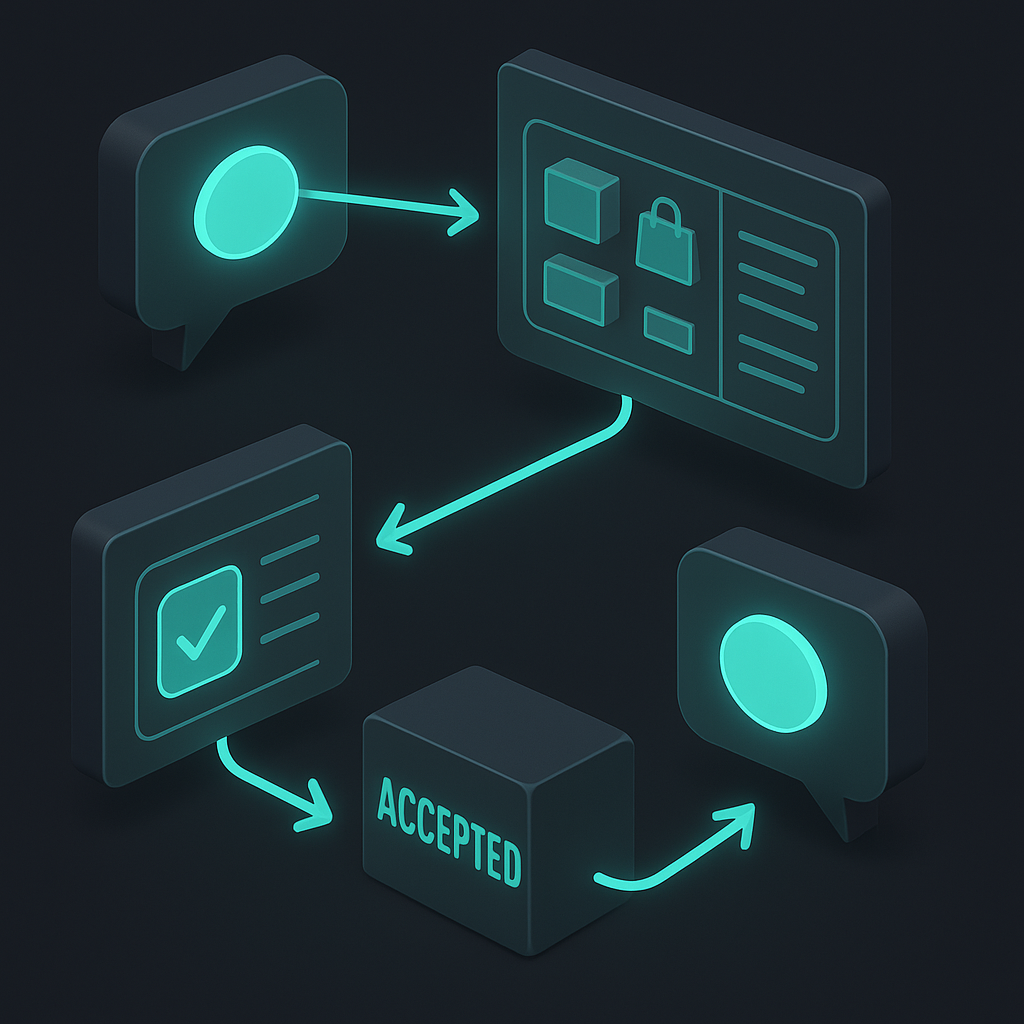
In this hybrid pattern, the bot owns chat entry and status messages. The Mini App contains product selection, fulfillment choices, a review screen, and confirmation controls. Case X: A merchant uses a bot and Mini App for an order that starts in chat, continues through an interactive catalog, and ends with a confirmation message.
Assumptions: The merchant maintains a shared backend for catalog and order records. The bot and Mini App use the same internal customer and transaction references. The example concerns workflow ownership rather than transaction volume, conversion, processing time, or other market results.
- 1. The user enters through the bot and requests the catalog. The bot creates a transaction reference and associates it with the current conversation. Failure sign: the backend cannot associate the reference with the conversation.
- 2. The bot presents the control that opens the Mini App transaction interface. The transaction reference accompanies the handoff. Failure sign: the Mini App opens an unrelated, expired, or unidentified draft.
- 3. The Mini App requests catalog data from the shared backend and displays the selection controls. Failure sign: the bot and Mini App display records from different backend states.
- 4. The user selects products and enters fulfillment information in the Mini App. Each update belongs to the same draft. Failure sign: changing a selection creates another draft or removes existing information.
- 5. The Mini App presents the assembled order for review. The backend checks the submitted fields against the active draft. Failure sign: required fields are absent or the draft reference no longer matches.
- 6. After confirmation, the backend changes the draft to the merchant’s accepted transaction state and returns that state to the Mini App. Failure sign: the interface displays confirmation without a corresponding backend record.
- 7. The bot sends the chat confirmation using the same transaction reference and can receive later status requests. Failure sign: the backend cannot retrieve the referenced transaction or it differs from the Mini App confirmation.
The structured portion occurs inside the Mini App, while the bot remains the conversational entry and notification channel. The shared transaction reference connects the handoff, draft, submission, and confirmation. A mismatch at any boundary is treated as a failed flow rather than a separate order.
Decision Checklist: Choose a Bot, Mini App, or Hybrid Setup
Choose a bot when the experience is mainly a conversation based on exchanged messages.[1] Choose a Mini App when users need an embedded JavaScript web application.[2] Choose a hybrid when the bot handles messaging and launches a Mini App for the web interface.[1]
- 1. Interaction surface — Bot passes if users can complete the task through messages; it fails if the task requires an embedded web interface. Mini App passes when that interface is required; hybrid passes when both surfaces belong in one flow.
- 2. Launch pattern — Mini App or hybrid passes if the experience should open from bot buttons, menus, direct links, inline mode, or another supported entry point.[2] Bot fails when messaging alone cannot present the required interaction.
- 3. Telegram interface controls — Mini App or hybrid passes if the interface needs buttons, themes, viewport behavior, or closing confirmation through the Telegram WebApp JavaScript API.[3] Bot passes when none of those controls is required.
- 4. Authentication boundary — Mini App or hybrid passes only if the server validates signed launch data before trusting it for authentication.[4] It fails if the implementation trusts client-supplied launch data without server-side validation.
- 5. Technical scope — Bot passes when the HTTP-based interface for exchanging messages is sufficient.[1] Mini App passes when the team will operate a JavaScript web application inside Telegram.[2] Hybrid requires both components.
- 6. Responsibility split — Hybrid passes when chat entry and ongoing messages belong to the bot while the embedded interface belongs to the Mini App. It fails when one surface can support the entire defined flow.
If every check points to messaging, select a bot. If every check points to an embedded web interface, select a Mini App. Select a hybrid only when the defined flow assigns necessary responsibilities to both.
Conclusion
The telegram mini app vs telegram bot decision starts with interaction design: bots suit concise conversations, alerts, and simple choices, while Mini Apps suit visual, screen-based workflows. A hybrid can use chat for entry and updates, then open an embedded workspace for more involved tasks.
Map your required user actions, interface needs, payment flow, and technical resources against the decision checklist, then select a bot, Mini App, or hybrid prototype. Validate authentication, backend sessions, payment handling, distribution, and ongoing operations within that prototype before committing to the full build.
Sources
- core.telegram.org — Telegram Bot API
- core.telegram.org — Telegram Mini Apps
- core.telegram.org — Telegram WebApp JavaScript API
- core.telegram.org — Telegram Mini App init data
- core.telegram.org — BotFather
- telegram.org — Telegram Stars
- core.telegram.org — Telegram Stars payments
- core.telegram.org — Telegram Gaming Platform
- core.telegram.org — Telegram Games API
- international — HMAC
- telegram.org — Telegram
- telegram.org — Telegram Mini App Store
- core.telegram.org — Telegram API
- core.telegram.org — Telegram Database Library (TDLib)
No comments yet. Be the first to comment!