
















Whether you decide to hire a development team for the first time, or you are switching from one team to another — the anxiety is often the same. You have a vision, a budget, and a deadline, but once the contract is signed, the actual work can feel like a black box.
You shouldn’t have to rely only on trust and luck.
The difference between a stressful and successful project launch lies in visibility. As a client, you don’t need to read code, but you do need to know how to read the signals of progress.
This guide covers the essential reports, artifacts, and habits a professional software development partner must provide to keep you in control without forcing you to micromanage.
Key Takeaways: How to Track Software Project Progress
Tracking software project progress means measuring whether the team is delivering the planned product outcomes, staying within agreed scope and timeline, and identifying risks early — not counting lines of code or hours worked.
The most important things to monitor are:
- Deliverables: What usable functionality was completed?
- Milestones: Are meaningful product milestones being reached on schedule?
- Scope: What is completed, remaining, added, removed, or changed?
- Timeline: Is the expected release date still realistic?
- Risks and dependencies: What could prevent the next milestone from being delivered?
- Decisions: Are unresolved client decisions blocking the team?
- Quality: Is completed functionality tested and accepted, or merely marked as “done”?
- Budget: Is actual spending consistent with the agreed plan?
- Evidence: Can the team demonstrate working software rather than only report activity?
A healthy project does not require the client to monitor developers every day. A consistent combination of weekly status reports, working demos, milestone tracking, backlog visibility, risk and dependency logs, and documented decisions provides visibility without micromanagement.
The most important question is not “How busy is the development team?” but “Are we reducing product risk and getting closer to a usable release?”
Why Progress Is Hard to See in Software Projects
In traditional industries like construction, progress is visual. You can see the foundation being poured or the walls going up. In software development, 80% of the work happens under the hood.
What counts as project progress?
In software development, progress should be measured by completed and validated outcomes rather than activity alone. A developer spending 40 hours on a feature does not necessarily mean that the project is 40 hours closer to release.
A stronger signal is a completed feature that has been implemented, tested, reviewed, demonstrated, and accepted against the agreed requirements.
This is why project tracking should connect work → deliverable → milestone → business outcome.
Developers might spend two weeks setting up server architecture, or refactoring a database. To you, the application looks exactly the same as it did two weeks ago. This invisibility creates the “90% done” trap, where a feature remains “almost finished” for weeks because the complexity was hidden.
To solve this, we need to translate technical effort into business artifacts. Real progress isn’t just lines of code; it is the reduction of risk and the delivery of testable features.
What Should You Measure to Track Software Project Progress?
There is no single metric that can tell you whether a software project is healthy. A useful tracking system combines several dimensions: delivery, scope, timeline, quality, risk, budget, and decision-making.
| Dimension | What to track | Healthy signal |
| Delivery | Completed, accepted functionality | Planned features are becoming usable increments |
| Scope | Added, removed, changed, and remaining work | Changes are visible and consciously prioritized |
| Timeline | Milestone and release dates | Forecast remains realistic |
| Quality | Defects, failed acceptance, rework | Quality problems are identified early |
| Risk | Open risks and mitigation actions | High-impact risks have owners and actions |
| Dependencies | Items waiting on clients or third parties | Dependencies are visible before they block delivery |
| Budget | Actual spend vs planned spend | Variance is understood and managed |
| Decisions | Unresolved stakeholder decisions | Important decisions are made before they block work |
The goal is not to create dozens of KPIs. A small number of reliable signals is more useful than a dashboard full of metrics that nobody acts on.
For clients, the most valuable question is whether the available evidence supports the current forecast: Is the team still likely to deliver the agreed scope at the expected quality, budget, and timeline?
What You Should Get Weekly From a Development Team (Minimum Set)
If you hire software developers who work remotely, silence is your enemy. You should never have to ask, “What is happening?” The answer should arrive in your inbox proactively.
At a minimum, a transparent delivery process includes:
- Weekly Status Report: A snapshot of scope, budget, and timeline.
- Roadmap / Milestone Plan: The strategic view of where we are going.
- Release Plan: Specifically what is being delivered next.
- Risk & Dependency Lists: What might stop us.
- Backlog Overview: The scope that is left to build.
| Artifact | What it tells the client | What to look for |
| Weekly Status Report | Current project health | Changes from the previous week |
| Roadmap | Where the project is going | Milestone dates and dependencies |
| Release Plan | What will be delivered next | Clear feature-level scope |
| Risk Log | What could go wrong | Owner + mitigation |
| Dependency Log | What the team is waiting for | Client/vendor blockers |
| Decision Log | What has already been agreed | Unresolved decisions |
| Backlog | What remains to be built | Scope changes and priorities |
| Demo | What actually works | Working, testable functionality |
If the team isn’t providing these, you aren’t managing a project — you are gambling on one, thus, no plans or release dates would work there.
The Weekly Status Report: A Simple Format Clients Can Trust
The most important update you could receive is the Weekly Status Report. It shouldn’t be too long. It should be a concise summary that respects your time, but reflects all the important project data, such as scope, budget, and timeline to see if the team’s still on track.
A professional report focuses on outcomes, not just activities. It answers the question: “Are we on track for the release?”
Here is the template you should expect:
- Summary (1–2 lines): A high-level sentiment of the project (e.g., “On track for Beta release, payment gateway integration is the main focus”).
- Done this week: Completed tasks that add value (e.g., “User Login finalized,” not “Fixed bug #402”).
- Next week plan: Key goals for the upcoming sprint.
- Blockers / Risks: Anything preventing the team from working (e.g., “Waiting for API keys from third-party vendors”).
- Decisions needed from stakeholders: Specific questions you need to answer to unblock the team.
A status report should show both current status and change over time.
A report saying “Project is Yellow” is less useful than one showing:
Last week: Yellow
This week: Red
Reason: Payment provider integration delayed by 5 working days
Impact: Checkout milestone moves from June 12 to June 19
Mitigation: Parallelize frontend testing while API issue is resolved
Decision needed: Client approval of fallback payment flow
This makes the report actionable rather than simply descriptive.
How to Read a Software Project Status Report
A project status report is useful only if the client knows how to interpret it. The most important part is not the color of the status indicator but the explanation behind it.
Green
The project is currently tracking against the agreed scope, timeline, budget, and quality expectations. There may still be risks, but none currently requires a change to the baseline plan.
Yellow
A risk or deviation has appeared that could affect the project if it is not addressed. The team should explain the cause, expected impact, mitigation, owner, and trigger for escalation.
Red
The current plan is no longer realistic without intervention. The project may require a scope change, timeline adjustment, additional resources, technical decision, or another corrective action.
A useful status report should therefore answer five questions:
- Where are we now?
- What changed since the previous report?
- What is likely to happen next?
- What could prevent it?
- What decision or action is required from the client?
This approach turns reporting into a decision-making tool instead of a weekly formality.
Roadmap, Milestones, and Release Plan: The Big-Picture View
While the weekly report covers the immediate future, the Roadmap ensures you don’t lose sight of the final goal.
A Roadmap visualizes the project in phases (MVP, V1.0, V2.0). It helps you align your marketing or fundraising activities with development output. Inside the roadmap are Milestones — critical checkpoints where a major chunk of functionality is complete.
- Bad Milestone: “Backend development.”
- Doesn’t represent functionality that is being done
- Doesn’t describe stage of development you’re currently working on
- Creates an effect of void between client and team, that could lead projects to scope creeps and deadline failures.
- Good Milestone: “User’s sign in and sign up flows”
- Represents feature that being worked on
- Progress can be tracked feature-by-feature
- Understandable from the client’s side.
| Weak milestone | Better milestone |
| Backend development | User registration and authentication completed |
| Frontend work | Checkout flow implemented and accepted |
| API integration | Payment provider integration tested end-to-end |
| Database work | Customer and order data migrated successfully |
| QA phase | Critical user journeys passed acceptance testing |
| DevOps | Production deployment pipeline validated |
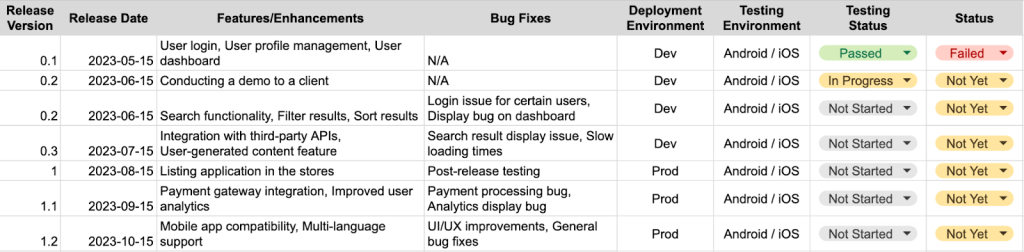
Finally, the Release Plan (or Delivery Plan) details exactly which features make it into the next build.
This is the example of Release plan that prevents unmet expectations where you expected a feature that the team planned for next month:
Backlog and Scope: How to Prevent “Silent Scope Creep”
Scope creep— the uncontrolled growth of project requirements — is the primary reason projects go over budget. But not every scope change is scope creep. Product development often requires requirements to change as users, markets, or technical constraints become clearer.
Scope creep occurs when changes are introduced without making their impact on timeline, budget, priorities, or other requirements visible.
A controlled change therefore follows a simple process:
Request → impact assessment → priority decision → approval → backlog update → timeline/budget adjustment.
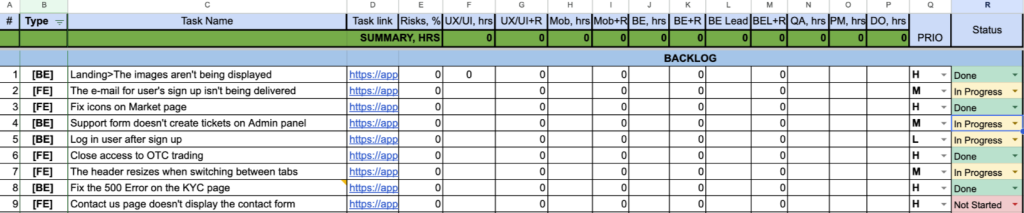
This allows the product to evolve without pretending that additional work has no cost. Below is the example how your Backlog can look like:
Risks, Dependencies, and Decisions: The 3 Things That Kill Timelines
Code rarely kills projects; indecision and uncovered risks do. Your vendor should maintain three specific logs:
- Risk List: A proactive list of “what ifs.” (e.g., “If Apple delays the App Store review, launch moves to Nov 1st”), for example

Identifying this early allows you to have a Plan B.
- Dependency List: A list of items the team needs from you or third parties. This keeps the ball in your court visible.
- Decision Log: A history of agreed changes. If you decided three months ago to drop a feature or add a new one, this log prevents confusion later when stakeholders ask, “Why isn’t this included?/Why have you added it?”

| Item | Typical owner | Client involvement |
| Technical risk | Tech Lead / Engineering Lead | Review if business impact is significant |
| Product risk | Product Owner / Client | High |
| Third-party dependency | PM / Client / Vendor | Depends on dependency |
| Business decision | Client / Product Owner | High |
| Delivery risk | Project Manager | Review mitigation |
| Scope decision | Client / Product Owner | High |
How to Track Project Progress Without Micromanaging Developers
Tracking progress and micromanaging developers are not the same thing. Micromanagement focuses on individual activity:
- How many hours did this task take?
- Why did the developer spend three hours on this ticket?
- What is everyone doing right now?
- Why isn’t every task updated immediately?
Effective project tracking focuses on outcomes:
- What was completed?
- What can we demonstrate?
- What changed?
- What is blocking the next milestone?
- Are risks increasing or decreasing?
- Is the release forecast still realistic?
A simple operating rhythm can provide enough visibility without constant supervision:
Weekly: status report + risks + dependencies + decisions needed
Every 1–2 weeks: working demo / sprint review
Monthly or at major milestones: roadmap and budget review
Continuously: backlog and project documentation
The client should be able to understand project health without asking developers for individual activity updates every day.
The principle is simple: Track evidence of progress, not evidence of busyness.
Dedicated Development Team vs Project-Based Development: What Changes in Tracking
How you track progress depends slightly on the engagement model you chose. In both cases, the principle is the same: trust, but verify through artifacts.
Dedicated Development Team: When you have a dedicated team, they function as your employees. You likely have deeper access to their daily workflow (Jira, Slack, Daily Standups). Here, you track velocity—how much work the team clears per week.
Project-based Development Team: If you are outsourcing a specific project, you focus less on the “how” and more on the “what.” You track adherence to the milestone dates and the quality of the deliverables.
| Tracking focus | Dedicated team | Project-based team |
| Daily workflow | More visible | Usually less relevant |
| Backlog | High visibility | High-level visibility |
| Velocity | Useful trend | Useful only in context |
| Milestones | Important | Very important |
| Deliverables | Important | Critical |
| Budget | Track capacity/cost | Track project burn and forecast |
| Risks | Continuous | Continuous |
| Client involvement | More frequent | More structured |
| Demo cadence | Weekly/biweekly | Usually milestone or sprint-based |

Software Development Outsourcing: How to Stay in Control Without Micromanaging
Many founders confuse “tracking” with “micromanaging.”
Micromanaging is asking a developer, “Why did this task take 4 hours instead of 3?” This kills morale and destroys trust.
Tracking is looking at the Weekly Report and asking, “I see the payment integration is a ‘Red’ risk. What do you need from me to fix it?”
To succeed in software development outsourcing, establish a rhythm. Agree on a fixed time for the Weekly Report and the Demo. If the rhythm is consistent and the data is clear, you won’t feel the urge to check in daily.
How a Software Development Partner Builds Trust (Signals and Habits)
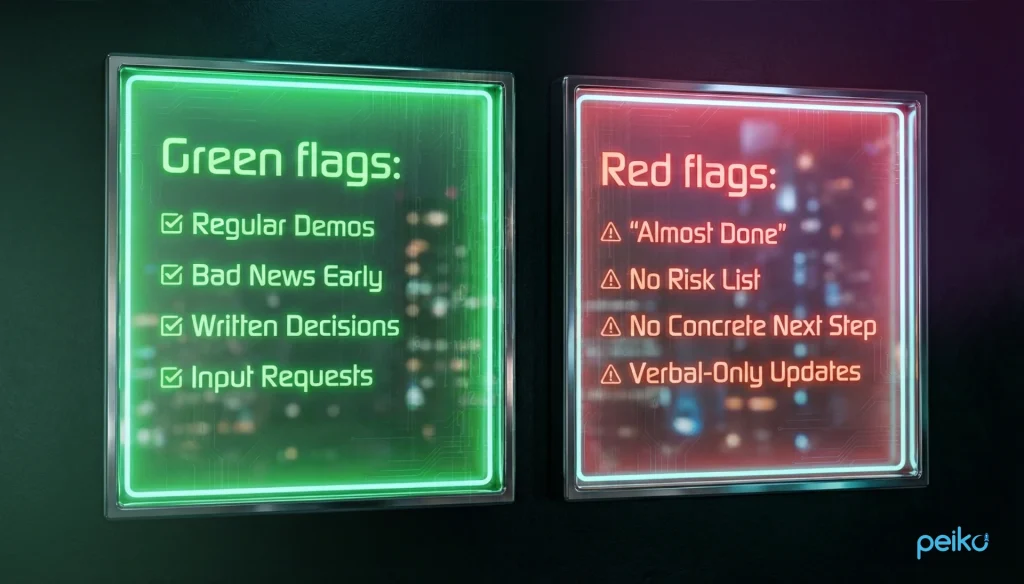
How do you know if your partner is being honest? Look for these signals:
Green flags (Signs of a healthy project):
| Green flag | Why it matters |
| Regular working demos | Provides evidence of actual progress |
| Bad news reported early | Gives time to mitigate risks |
| Written decisions | Prevents future disagreements |
| Clear next steps | Makes accountability visible |
| Specific milestone dates | Makes progress measurable |
| Transparent backlog | Makes scope visible |
Red flags (Signs of trouble):
| Red flag | Why it matters |
| “Almost done” for weeks | Progress cannot be objectively verified |
| No risk list | Risks may be discovered too late |
| Verbal-only reporting | No reliable project record |
| Vague milestones | Progress cannot be measured |
| No concrete next step | Team may lack a realistic short-term plan |
| Repeated unexplained deadline changes | Forecasting or delivery control may be weak |
Project Progress Metrics: Which KPIs Actually Matter?
Project tracking does not require dozens of KPIs. A small set of metrics can provide a much clearer picture of project health.
| KPI | What it measures | Why it matters |
| Milestone variance | Planned vs actual milestone dates | Shows schedule deviation |
| Scope change rate | How much agreed scope changes over time | Highlights requirements instability |
| Open high-severity risks | Significant unresolved risks | Shows exposure to future disruption |
| Blocker age | How long critical blockers remain unresolved | Identifies stalled work |
| Defect trend | New vs resolved defects | Provides a quality signal |
| Rework | Work repeated because requirements or implementation changed | Shows hidden delivery cost |
| Decision latency | Time needed to resolve important decisions | Identifies stakeholder bottlenecks |
| Budget variance | Actual vs planned spending | Shows financial deviation |
| Delivery predictability | Planned vs actually completed work | Helps assess forecast reliability |
No single KPI should be treated as proof that a project is healthy or unhealthy. Metrics need context.
For example, a temporary drop in velocity may be completely reasonable if the team is resolving technical debt or working on a complex architectural milestone. Conversely, a high velocity does not guarantee that the right product is being built.
The best project dashboard combines delivery evidence with risk, quality, scope, and forecast information.
Client Checklist: How to Know Your Project Is On Track
Use this checklist to evaluate your current engagement. If you can check these boxes, your project is under control.
Project Tracking: What Should You Check?
| If you want to know… | Look at… |
| Are we making progress? | Completed and accepted functionality |
| Are we on schedule? | Milestone variance + release forecast |
| Is scope under control? | Backlog + change log |
| What could delay us? | Risk + dependency logs |
| Are we blocked? | Blocker list + decision log |
| Is quality acceptable? | Testing + defect/rework trends |
| Are we overspending? | Budget variance + forecast |
| Can I trust the forecast? | Historical delivery vs planned delivery |
| Is the vendor transparent? | Reports + demos + early escalation |
Ask yourself:
Delivery
- Can I see working software regularly?
- Do I know what was completed since the last update?
- Are milestones connected to actual product functionality?
Scope
- Do I know what remains to be built?
- Are scope changes explicitly documented?
- Do I understand the impact of new requests on timeline and budget?
Timeline
- Is the current release forecast still realistic?
- Are milestone deviations explained?
- Do I know which dependencies could affect the deadline?
Risk
- Do I have visibility into major project risks?
- Does each important risk have an owner and mitigation plan?
- Are problems communicated before they become emergencies?
Communication
- Do I receive reports on an agreed schedule?
- Are important decisions documented?
- Do I know when the development team needs a decision from me?
Quality
- Are completed features tested and demonstrated?
- Are significant defects visible?
- Is rework being monitored?
If you cannot answer several of these questions, the problem may not be that the development team is moving slowly. You may simply lack the visibility needed to determine project health.
Conclusion
Tracking software project progress does not mean watching developers work. It means having enough reliable evidence to understand whether the product is moving toward its intended outcome.
A healthy tracking system connects:
Deliverables → milestones → scope → risks → quality → budget → release forecast.
For clients working with an external development team, the minimum useful system is straightforward: regular status reports, meaningful milestones, a visible backlog, risk and dependency tracking, documented decisions, and regular demonstrations of working software.
When these elements are in place, you don’t need to ask your development team what they are doing every day. You can see where the project stands, understand what changed, identify what needs your attention, and make decisions before small problems become expensive ones.
The goal of project tracking isn’t to control the development team. It’s to make project health visible.
No comments yet. Be the first to comment!