


















Pushing a new SaaS product to production is stressful. Between scaling the database, fixing last-minute frontend bugs, and configuring DNS, security often gets pushed down the backlog. “We’ll secure it properly when we get our first 1,000 users”, is a common trap.
The reality? Automated scanners don’t care if you’re an early-stage startup or a Fortune 500 company. A single misconfigured S3 bucket or exposed API endpoint can end your runway overnight.
This guide isn’t about vague theory. It’s a hardened, practical SaaS security checklist designed for CTOs, DevOps, and Security Engineers preparing for launch. We’ll break down concrete SaaS security requirements, from locking down your cloud infrastructure to establishing a reliable vulnerability management process. Consider this your definitive blueprint for conducting a pre-launch SaaS security assessment.
1. Common SaaS Security Mistakes Before Launch
Teams rushing to production usually make the same architectural compromises. Here is what typically goes wrong:
- Zero tenant isolation: Mixing customer data in the same tables without row-level security or logical separation.
- Hardcoded secrets: Leaving API keys and database credentials in .env files pushed to Git repositories.
- Missing audit logs: Failing to log who accessed what, making post-breach forensics impossible.
- No rate limiting: Leaving APIs exposed to simple brute-force or denial-of-service (DoS) attacks.
- Over-privileged cloud IAM roles: Giving the web application full AdministratorAccess to the AWS/GCP account.
- Publicly exposed databases: Leaving PostgreSQL or MongoDB instances bound to 0.0.0.0 instead of a private subnet.
- Ignoring third-party dependencies: Shipping with critically vulnerable NPM or PyPI packages.
- Default admin credentials: Forgetting to rotate default passwords on self-hosted infrastructure tools (like Redis, RabbitMQ).
- Lack of environment parity: Testing security in staging, but manually applying unreviewed configurations to production.
- No offsite backups: Storing backups in the same compromised environment as the primary database.
2. Infrastructure & Cloud Native Security
Modern SaaS products don’t run on physical racks; they rely on elastic, distributed cloud environments. Proper cloud native security means assuming the network is hostile.
Infrastructure as Code Security
Manual clicks in the AWS console lead to configuration drift and security gaps. Infrastructure as Code security requires you to treat your infrastructure with the same rigor as your application logic.
- Require strict peer review for all Terraform, Pulumi, or CloudFormation PRs.
- Integrate static analysis tools (like Checkov or tfsec) directly into your Git hooks to block insecure configurations before they are merged.
- Maintain strictly separate state files for development, staging, and production environments.
CI/CD Security
Your deployment pipeline is the key to the kingdom. If an attacker compromises your GitHub Actions or GitLab CI, they own production.
- Restrict pipeline access: Only specific protected branches (e.g., main) should trigger production deployments.
- Use ephemeral runners: Avoid long-lived build servers that can cache sensitive data.
- Secret management: Never inject secrets as plaintext build arguments. Use secure injection via AWS Secrets Manager, HashiCorp Vault, or native GitHub Secrets.
- Scan container images: Ensure your Docker images are scanned for OS-level vulnerabilities before being pushed to the registry.
Network Segmentation
- VPC design: Place databases and internal caching layers in private subnets with no direct internet route.
- Ingress/Egress control: Route all incoming traffic through a Web Application Firewall (WAF) and restrict outbound traffic (egress) to prevent data exfiltration.
3. Application & API Security
Your API is the primary attack surface. Attackers will probe it continuously.
API Security Checklist
Use this API security checklist to harden your endpoints:
- Require authentication on all endpoints (except public health checks).
- Implement strict rate limiting per IP and per user token.
- Validate all incoming input against strict schemas (reject unknown payloads).
- Use parameterized queries or ORMs exclusively to prevent SQL injection.
- Avoid predictable sequential IDs (like user/123); use UUIDv4 for public-facing identifiers.
- Implement proper CORS policies; never use Access-Control-Allow-Origin: * in production.
- Strip descriptive stack traces from production error responses.
Tenant Isolation Architecture
How you separate customer data dictates your risk exposure (the “blast radius”).
- Silo Model: Dedicated infrastructure per tenant (high cost, high security).
- Pool Model: Shared infrastructure with logical separation via tenant_id columns and Row-Level Security (RLS) in the database.
- Hybrid: Shared compute, but dedicated databases per enterprise client.
Data Encryption
Handling user data requires strict encryption standards.
- Data encryption at rest: Enable native volume encryption (e.g., AWS EBS encryption, S3 SSE-KMS) using AES-256.
- Encryption in transit: Force TLS 1.2 or higher for all external traffic. Disable older SSL protocols completely.
4. Identity and Access Management (IAM)
Authentication is notoriously easy to get wrong. Don’t roll your own crypto, and ideally, don’t roll your own auth if you can avoid it.
Single Sign-On (SSO)
Implementing Single Sign-On (SSO) is heavily requested by B2B clients and significantly improves your security posture.
- Support SAML 2.0 or OIDC for enterprise clients to integrate with Okta, Azure AD, or Google Workspace.
- Enforce Just-in-Time (JIT) provisioning to map roles automatically based on the identity provider’s payload.
Password Policy Best Practices
If you must handle local credentials, adhere to modern password policy best practices:
- Enforce a minimum length (e.g., 12+ characters) rather than requiring complex, hard-to-remember character combinations.
- Check new passwords against databases of breached credentials (like HaveIBeenPwned).
- Hash passwords using Argon2 or bcrypt with an appropriate work factor.
- Support and strongly encourage Time-Based One-Time Passwords (TOTP) for Multi-Factor Authentication (MFA).
5. Vulnerability Management Process
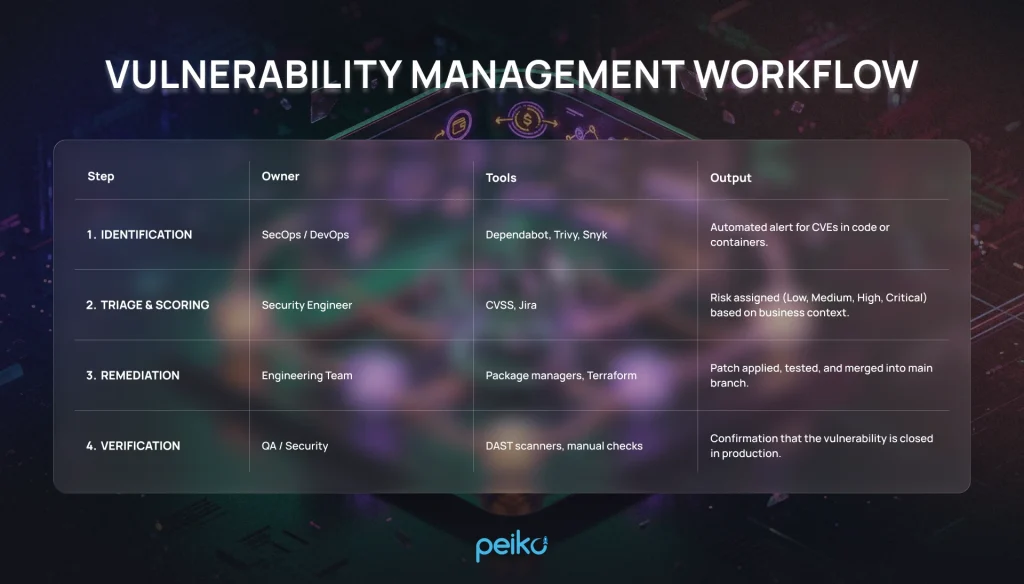
Security isn’t a pre-launch checkpoint; it’s a continuous lifecycle. A formal vulnerability management process ensures that when a new CVE drops, your team knows exactly what to do.
Vulnerability management workflow:
Penetration Testing Checklist
Before taking enterprise money, you need a third-party to try and break your system. Follow this penetration testing checklist:
- Define the scope (which APIs, subdomains, and cloud assets are in-bounds).
- Prepare test accounts for different tenant roles (Admin, User, Read-Only).
- Schedule the test during low-traffic hours and notify the engineering team.
- Ensure the testing firm uses a blend of automated scanning and manual exploitation (logic flaws cannot be found by scanners).
- Demand a prioritized remediation report, not just a raw PDF export from Nessus.
6. Compliance and Audit Readiness (SOC 2)
If you are selling B2B SaaS, customers will ask for compliance documentation. Understanding SOC 2 Type 1 vs Type 2 is critical. Type 1 is a snapshot of your security design at a specific point in time. Type 2 proves you actually followed those procedures over an observation period (usually 3 to 12 months).
SOC2 evidence examples
| Control | Evidence example | Where to store |
| Logical Access | Screenshots of AWS IAM policies showing MFA enforced. | Compliance Portal / Vanta / Drata |
| Change Management | GitHub PRs showing required approvals before merge. | Git History / Compliance Portal |
| Vulnerability Scanning | PDF reports from weekly automated infrastructure scans. | Secure S3 Bucket / Jira |
| Incident Response | Post-mortem document from a recent outage or tabletop exercise. | Confluence / Internal Wiki |
7. Minimal Security Baseline for Launch
Don’t launch without checking every box on this list. This is the absolute minimum standard for 2026.
- MFA enforced for all internal developer accounts (GitHub, AWS, Vercel).
- All S3 buckets / cloud storage set to private by default.
- CloudTrail (or equivalent) enabled for cloud provider audit logs.
- Database accessible only from private application subnets.
- Database backups automated and tested for recovery.
- Application secrets managed via Vault or Secret Manager.
- HTTPS/TLS enforced globally; HTTP redirects to HTTPS.
- Security headers configured (HSTS, CSP, X-Frame-Options).
- Passwords hashed using bcrypt/Argon2.
- Application rate limiting enabled on auth endpoints.
- Dependency scanning (SCA) running on every pull request.
- Application logs centrally aggregated (Datadog, ELK, CloudWatch).
- No sensitive data (PII/credentials) logged in plain text.
- WAF deployed in front of the primary application domain.
- Vulnerability disclosure program (security.txt file) published.
- Default credentials changed on all third-party services.
- IAM roles strictly adhere to the principle of least privilege.
- CORS configured to only allow authorized origins.
- Inactive user sessions automatically timed out.
- Basic Incident Response plan documented.
8. Enterprise-Ready Add-ons
When you start moving upmarket, procurement teams will expect these advanced features.
- SAML/OIDC SSO integration support.
- Role-Based Access Control (RBAC) with custom permission boundaries.
- Customer-facing Audit Logs (exportable via UI or API).
- Bring Your Own Key (BYOK) for database encryption.
- Data residency controls (ability to host data specifically in the EU or US).
- Annual third-party manual penetration test reports.
- Active SOC 2 Type 2 compliance report.
- Dedicated tenant infrastructure routing (Single-tenant options).
- IP allowlisting functionality for tenant APIs.
- Automated data retention and deletion policies.
9. The Ultimate SaaS Security Assessment Checklist
Use this printable framework to conduct your final internal review.
SaaS security requirements by area:
| Area | Control | Why it matters | Minimum baseline (Yes/No) |
| Network | Web Application Firewall | Blocks common attacks (XSS, SQLi) before they hit the app. | |
| Data | Encryption at Rest | Protects physical storage media from data extraction. | |
| Code | Static Analysis (SAST) | Catches insecure coding patterns early in the pipeline. | |
| Access | Multi-Factor Auth (MFA) | Prevents account takeovers from leaked passwords. | |
| Operations | Centralized Logging | Essential for identifying and investigating security incidents. |
Conclusion
Implementing robust SaaS security best practices is not a one-time project you finish right before launch. It is an ongoing cultural shift within your engineering team. By securing your CI/CD pipelines, locking down cloud permissions, and establishing a clear vulnerability management process today, you save yourself hundreds of hours of painful refactoring and panic when enterprise clients demand security audits.
Treat this checklist as a living document. Secure the baseline, launch your product, and incrementally layer on advanced controls as your threat model evolves.
No comments yet. Be the first to comment!